
Google Ads Academy: Campaigns, Ad Groups, Keywords & Ads
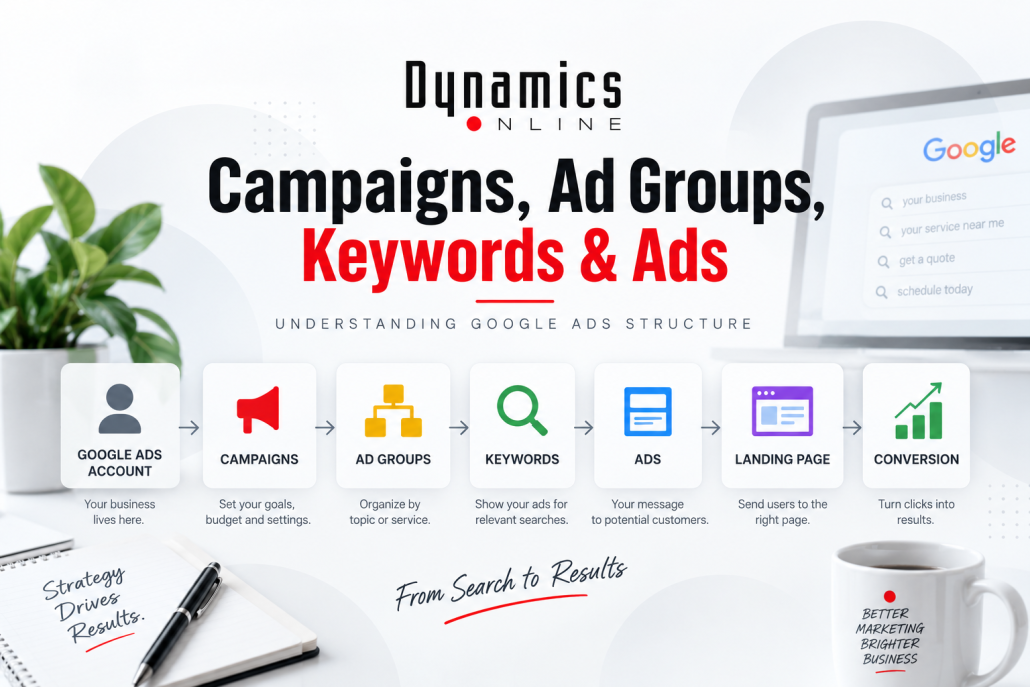
If you’re new to Google Ads structure, opening an account for the first time can feel like walking into a control room with a hundred buttons and no instruction manual.
Campaigns. Ad groups. Keywords. Ads. Assets. Search terms. Bidding strategies.
Where do you even start?
The good news is that Google Ads becomes much easier to understand once you see how all these pieces fit together. Whether you’re a business owner managing your own advertising or a new marketing professional managing campaigns for clients, getting the structure right is one of the most important things you can do before worrying about advanced optimization.
Let’s break it down in plain English.
Think of Google Ads Like a Filing Cabinet
One of the easiest ways to understand a Google Ads account is to picture a filing cabinet.
Your Google Ads account is the entire cabinet.
Inside that cabinet are campaigns.
Inside each campaign are ad groups.
Inside those ad groups are the keywords and ads associated with a particular topic, product or service.
For a simple Search campaign, the hierarchy looks something like this:
Google Ads Account
↓
Campaign
↓
Ad Groups
↓
Keywords + Ads
↓
Landing Page
↓
Conversion
Each level has a different job. When those pieces are organized logically, Google has better information to work with—and you have a much easier account to manage.
Level 1: The Campaign
A campaign is one of the highest levels of organization within your Google Ads account.
This is where many of the big decisions are made, including things like your campaign objective, budget, bidding strategy, geographic targeting and campaign type.
Let’s imagine you own a home services company offering:
- Plumbing
- HVAC
- Electrical services
It may make sense to separate those services into different campaigns.
Why?
Because you might want to spend $3,000 per month advertising HVAC services but only $1,000 on electrical work. You may also want to target different geographic areas or use different bidding strategies.
Separating those services gives you greater control.
💡 Beginner Tip
Don’t create campaigns just because you can.
Campaigns should usually be separated when there is a meaningful business reason to separate them—such as different budgets, locations, objectives, products or services.
Good Google Ads structure isn’t about creating the most complicated account.
It’s about creating the clearest one.
Level 2: The Ad Group
Inside each campaign are ad groups.
Think of an ad group as a smaller category dedicated to one closely related topic.
Let’s use our HVAC campaign.
You might create ad groups for:
- AC Repair
- Furnace Repair
- HVAC Installation
- Commercial HVAC
Each ad group can contain keywords and ads specifically related to that service.
This is important because relevance matters.
If someone searches for “emergency AC repair,” you don’t want to show them a generic ad about heating, cooling, plumbing and electrical work.
You want an ad that says:
Need AC Repair? Schedule Service Today.
That creates a much clearer connection between what the person searched for and what your business is offering.
Level 3: Keywords
Keywords help Google understand the searches you’re interested in targeting.
For our AC Repair ad group, keywords might include phrases such as:
- AC repair near me
- air conditioner repair
- emergency AC repair
- AC repair company
But there’s an important distinction beginners often miss:
A keyword is not necessarily the exact phrase someone typed into Google.
Your keyword is what you’re targeting.
The search term is what the customer actually searched.
Google’s matching technology can connect your keywords with related searches based on meaning and intent. That can help you reach customers you may not have anticipated—but it can also lead to irrelevant traffic if you aren’t paying attention.
That’s why choosing good keywords is only the beginning.
You also need to monitor what searches are actually triggering your ads.
We’ll dig much deeper into keywords, match types and search terms later in Google Ads Academy.
⚠️ Watch Your Budget
Don’t assume that adding hundreds of keywords will create hundreds of opportunities.
A large, unfocused keyword list can make an account harder to manage and potentially expose your ads to searches that don’t make sense for your business.
Start with intent.
What would someone search if they genuinely needed this product or service?
That’s a much better question than, “How many keywords can I add?”
Level 4: The Ads
Now we get to what the customer actually sees.
Your ads should connect the searcher’s intent with your business.
If someone searches for AC repair, the ad should talk about AC repair.
Simple, right?
You’d be surprised how often this connection gets lost.
A common mistake is creating generic ads and using them across several unrelated ad groups.
The stronger approach is to make your messaging relevant to the searches associated with that ad group.
Google’s Responsive Search Ads allow advertisers to provide multiple headlines and descriptions. Google can then test different combinations to determine which messaging is most useful for different searches.
This is where Google’s automation can be extremely helpful—but only if you give it strong material to work with.
🤖 What Google Wants
Google wants to show users ads that are relevant and useful.
Give the system several strong headlines and descriptions that communicate your services, benefits, differentiators and calls to action.
Automation cannot turn weak messaging into a great advertising strategy.
Don’t Forget the Landing Page
The structure doesn’t stop when someone clicks your ad.
Where are you sending them?
Let’s say someone searches:
“commercial HVAC repair”
They see your commercial HVAC ad.
They click.
Then you send them to a generic homepage where they have to search through residential plumbing, electrical services and company history before finding anything about commercial HVAC.
You’ve created unnecessary friction.
Whenever possible, the landing page should continue the conversation started by the keyword and ad.
Search: Commercial HVAC repair
↓
Ad: Commercial HVAC Repair Services
↓
Landing Page: Commercial HVAC Repair
↓
CTA: Request Service
That’s a logical customer journey.
Why Structure Matters for Optimization
Here’s where good account structure really pays off.
Imagine your HVAC campaign isn’t producing enough conversions.
If everything is thrown into one giant campaign and one giant ad group, determining what’s wrong becomes difficult.
But if your account is organized logically, you can investigate.
Maybe AC Repair is performing extremely well.
Furnace Repair is average.
Commercial HVAC is generating clicks but no leads.
Now you know where to look.
You can review Commercial HVAC’s keywords, search terms, ads, landing page, bidding and conversion tracking without disrupting parts of the account that are already working.
Good structure doesn’t just help Google.
It helps you make better decisions.
🎯 What We Recommend
At Dynamics Online, we generally want campaign structure to mirror the way the business actually operates.
Ask yourself:
- What are we selling?
- Which services deserve their own budget?
- Which searches have different intent?
- Where should those users land?
- What action do we want them to take?
Build the structure around those answers instead of trying to force the business into an unnecessarily complicated Google Ads setup.
🔧 Try This in Your Account
Open your Google Ads account and choose one active Search campaign.
Look at its ad groups.
Can you clearly describe what each ad group is about in a few words?
Now look at the keywords inside each one.
Do they all relate closely to that topic?
Then look at the ads.
Would someone immediately recognize that the ad addresses what they searched for?
Finally, click through to the landing page.
Does that page continue the same conversation?
If you start seeing disconnects along that path, you’ve probably found opportunities to improve your campaign.
Good Google Ads Structure Should Make Sense
You don’t need to memorize every Google Ads feature to build a strong campaign.
Start with the foundation.
Your campaign establishes the larger strategy.
Your ad groups organize related topics.
Your keywords help connect searches with those topics.
Your ads communicate your offer.
Your landing pages continue the customer journey.
And your conversions tell you whether that journey actually produced the result you wanted.
Once you understand that structure, the rest of Google Ads becomes much easier to learn.
Continue Google Ads Academy
Next, we’ll take this foundation one step further:
How to Structure a Google Ads Campaign the Right Way
We’ll look at how many campaigns and ad groups you actually need, when services should be separated, how to organize an account without overcomplicating it, and some of the structural mistakes that can quietly waste your advertising budget.
Need Help With Your Google Ads?
Whether you’re trying to make sense of an existing campaign or want an experienced team managing your paid search strategy, Dynamics Online can help. We build, manage and optimize Google Ads campaigns with a focus on the metrics that matter most: qualified traffic, conversions and making smarter use of your advertising budget. Reach out to